
Seeing a warning in your Google Ads account can be confusing. Sometimes it’s just a single ad that gets disapproved; other times, your entire account ends up suspended.
The difference matters because a disapproved ad only pauses one campaign, but a suspension stops everything and often requires a full appeal. Many advertisers mix the two up and waste time trying the wrong fix.
In this guide, we’ll break down the real difference and show you how to handle both situations. If your account is already suspended, refer to the Google Ads suspension guide to help you take the next right step.
What Does Google Ads Suspended Mean?
When your account shows “Google Ads suspended”, it means Google has stopped all your campaigns. None of your ads will run until the issue is fixed and your account is reinstated. Suspensions usually happen for serious reasons like circumventing system policies, suspicious payment activity, or a site flagged for malicious software.
It’s not just a pause. A suspension blocks you from creating new ads or editing old ones, and ignoring it can lead to permanent loss of the account.
The right move is to review the exact reason in your account, fix the underlying issue, and then file a proper appeal. A full guide on suspicious payment activity explains one of the most common causes.
What Does Disapproved Ads Mean?
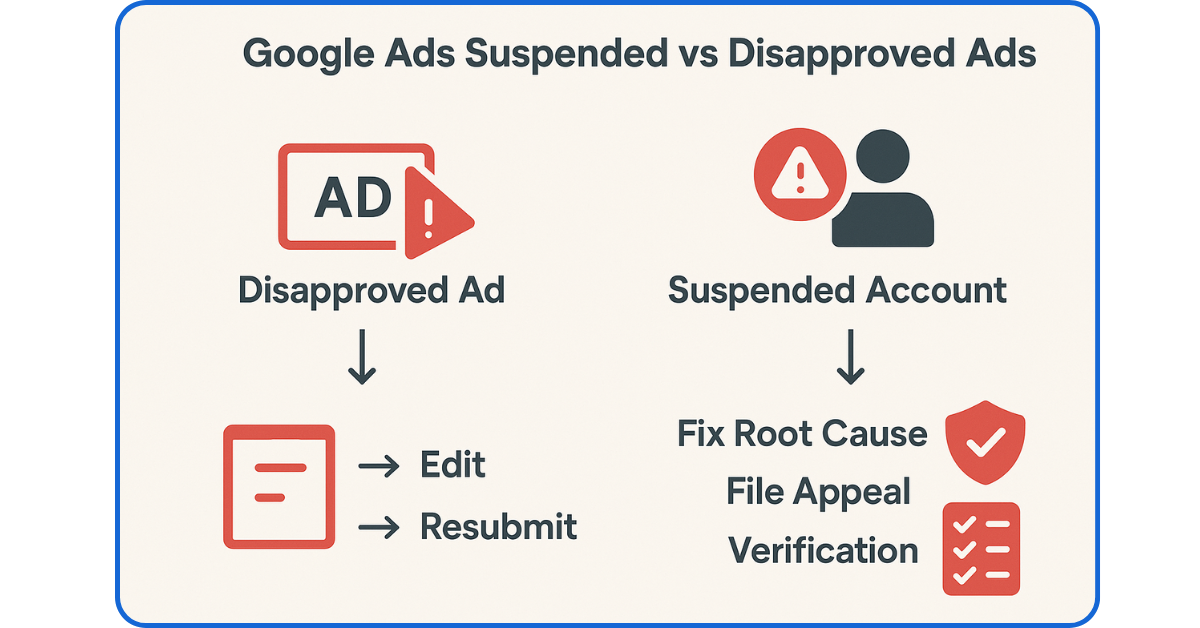
A disapproved ad is very different from a suspended account. In this case, Google only blocks specific ads or assets that break its rules.
The rest of your campaigns can keep running normally. Common reasons include misleading claims in the copy, a broken or mismatched landing page, or using restricted terms without approval.
The fix is usually simple. You edit the ad, correct the problem, and resubmit it for review. In most cases, once the issue is resolved, the ad gets approved and starts serving again.
If you’re not sure why it happened, check the Policy Manager inside your account for details. Interestingly, a recent survey found that 78% of advertisers have had at least one ad disapproved, and 58% also reported their account had been suspended at some point.
That shows just how common disapprovals are and why fixing them quickly is so important.
All deeper issues, like unacceptable business practices, can trigger repeated disapprovals.
Suspended vs Disapproved: Side-by-Side Comparison
It’s easy to confuse a disapproved ad with a suspended account, but the impact is very different. A disapproval affects only one ad or campaign, while a suspension locks down your entire account. To make the difference clear, here’s a quick comparison:
| Factor | Disapproved Ad | Suspended Account |
| Scope | Only the specific ad or asset is blocked | All campaigns and ads are stopped |
| Typical Triggers | Misleading claims, destination mismatch, restricted terms | Circumventing systems policy, suspicious payments, malware, and unacceptable practices |
| Impact | Other ads continue to run | Nothing runs until it is reinstated |
| Fix Path | Edit → Resubmit → Appeal if needed | Correct violation → Submit appeal with evidence |
| Timeline | Usually resolved within a few days once fixed | It can take weeks, depending on Google’s review |
Understanding this difference helps you act faster and avoid bigger problems. Repeated disapprovals can even escalate into strikes that lead to a full Google Ads suspended status, something we discuss in detail in the ad suspension guide.
How to Diagnose & Fix Issues Quickly
The first step is figuring out whether you’re dealing with a disapproved ad or a full Google Ads suspended account. Google gives you clues inside the Policy Manager.
- If you see a suspension banner at the top of your account, all campaigns are paused. This means your account is suspended. Review the reason listed (for example, suspicious payment activity or circumventing system policy). Fix the issue on your site, billing, or setup, then file a clear appeal with supporting evidence.
- If only certain ads are flagged as “Disapproved”: This is an ad-level problem. Open the affected ad, check the violation reason, and edit it to comply. Once you resubmit, it usually goes back into review and can start serving again within a few days.
Think of it as a decision tree: One ad flagged? Fix and resubmit. Whole account locked? Correct the root cause and appeal. For deeper issues like a compromised site, you’ll need to clean your website first before even thinking of an appeal.
Avoid Escalation in 2025
One mistake advertisers make is ignoring disapprovals, assuming they’re minor. In 2025, Google uses a strike system that can quickly escalate repeated violations.
A warning comes first, then strikes, and eventually your entire account can end up suspended.
The key is to act fast. Fix disapproved ads as soon as you see them, keep your landing pages clean, and make sure your business information is transparent. Completing steps like advertiser verification also lowers your risk.
Think of it like this: a single disapproval is a small crack in the wall. If you leave it unfixed, it grows into a suspension that’s much harder to repair. Staying proactive keeps your ads running and your account safe.
FAQs
- Why did my Google Ads get suspended instead of being disapproved?
A suspension means Google found a serious issue at the account level, like suspicious payments or policy evasion. A disapproval usually applies only to a specific ad. - Can disapproved ads lead to account suspension?
Yes, if you repeatedly ignore disapprovals or keep submitting non-compliant ads, Google may escalate it to strikes and then suspend the account. - How long does it take to fix disapproved ads?
Once you edit and resubmit, reviews typically take a few days. If the changes meet policy, the ad starts running again. - How do I appeal a Google Ads suspension in 2025?
First, fix the root issue. Then file one clear, detailed appeal through your account’s Policy Manager.
Final Thoughts
Knowing the difference between a disapproved ad and a Google Ads suspended account can save you time and money.
A disapproval is often a quick fix, while a suspension demands a deeper review and formal appeal. The sooner you act, the better your chances of keeping campaigns healthy.
Read More:
Google Guarantee Program: A Futuristic Tool to Build Trust for Your Business
Semantic Search- How Search Engines Decode a User’s Query Now